Message Rules
Message rules send a different message, or no message at all, when an order matches conditions you choose. For example:
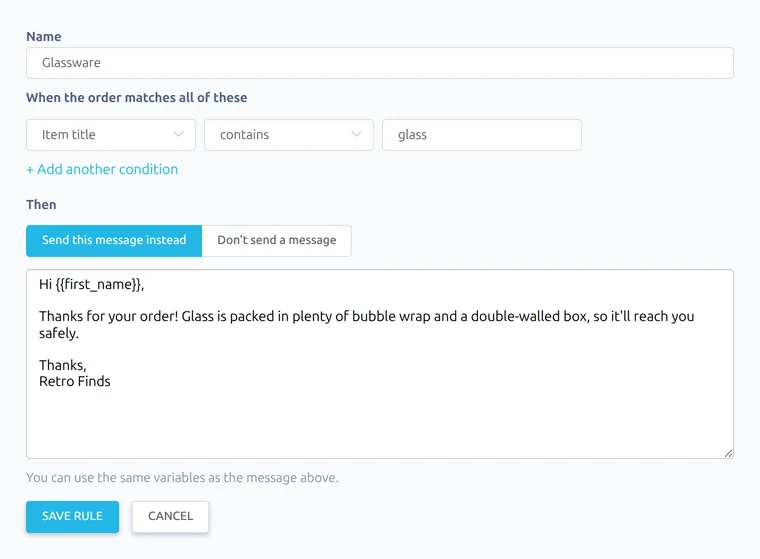
- extra packing details for anything with "glass" in the title
- a warmer thank you for returning buyers
- no feedback reminders for overseas orders
Each message type (purchase, dispatch, feedback received and feedback reminder) has its own rules, under the message on Preferences → Messages.

How rules work
- Rules are checked from the top. The first rule that matches is used, and the others are ignored. Use the arrows to change the order.
- Orders that match no rules get the normal message.
- Rules only apply while that message type is switched on.
- Switch a rule off to stop using it without deleting it.
Adding a rule
Click + Add a rule, give it a name, and add one or more conditions. An order must match all of a rule's conditions.
| Condition | Options |
|---|---|
| SKU | is, contains or starts with |
| Item number | is |
| Item title | contains |
| Order total | is at least or is at most |
| Number of items | is at least |
| Buyer's country | is or is not (your own country, or any other) |
| Buyer | is a returning buyer, or is buying for the first time |
Conditions about items match if any item in the order matches.
Then choose what happens:
- Send this message instead: write the message to send. You can use the same variables as the normal message.
- Don't send a message: nothing is sent for orders that match.