Profit Reports
The profit report shows what you actually make from your sales after everything is paid for. Open it from Reports → Profit.

How profit is worked out
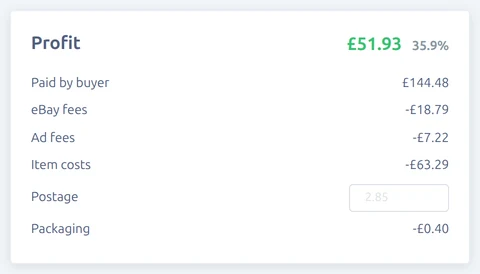
For each completed or refunded order, Vendsta starts with what the buyer paid and takes off:
- Refunds: anything you refunded.
- eBay fees: the real fees eBay charged, once your account is connected to eBay's finances service. Until then, the final value fee shown on the order. See eBay Fees.
- Ad fees: Promoted Listings costs for the order (real fees only).
- Item costs: the quantity sold times each item's cost. See Adding Item Costs.
- Postage: the postage you set on the order, otherwise the cost of an eBay postage label bought for it, otherwise your default postage cost.
- Packaging: your default packaging cost.
When an order is fully refunded, its item costs aren't counted, because the item usually comes back to you. Fees, postage and packaging still are.
Margin is profit as a percentage of what you kept after refunds.
The report
- The top of the report shows your profit, margin, takings, eBay fees and costs for the dates you've picked, with the change against the previous period.
- Profit by Date charts profit against fees and costs by day, week or month.
- Products by Profit lists every product you sold with its units, sales, profit and margin, best first.
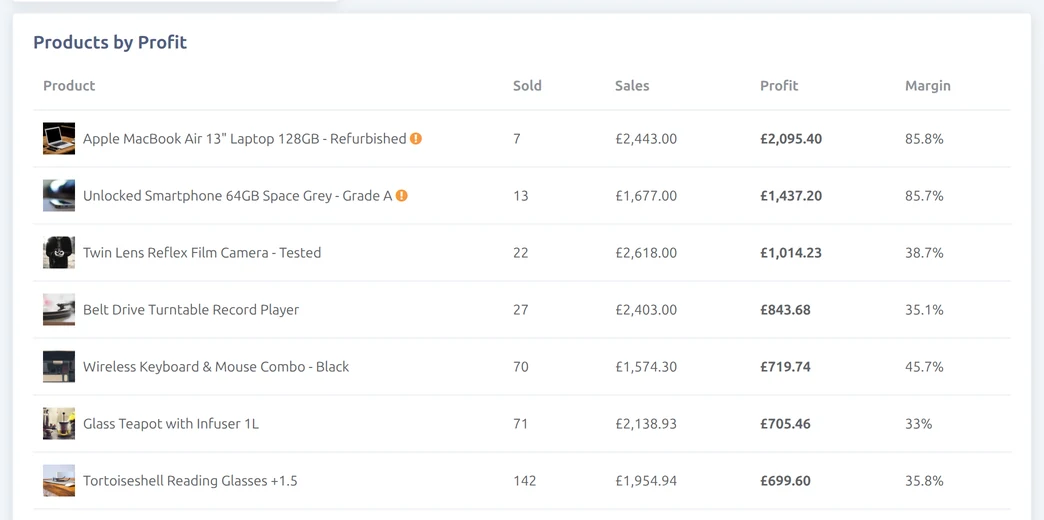
Orders missing costs counts orders with at least one item that has no cost yet. Their profit is shown, but it's too high until you add the costs.
Profit for a single order
Each order's page has a Profit card with the same breakdown. You can change the postage for that order there, for example when you sent it by a more expensive service.