Instant Notifications
Instant notifications tell you about important things as soon as they happen. Set them up on Preferences → Notifications.
Events
Each channel can be sent any of these:
- New orders
- Negative feedback and Neutral feedback
- Low stock: see Low Stock Alerts
- Orders at risk: see Feedback Protection
Adding a channel
Choose where to send notifications, enter the address, tick the events you want, and click Add channel.
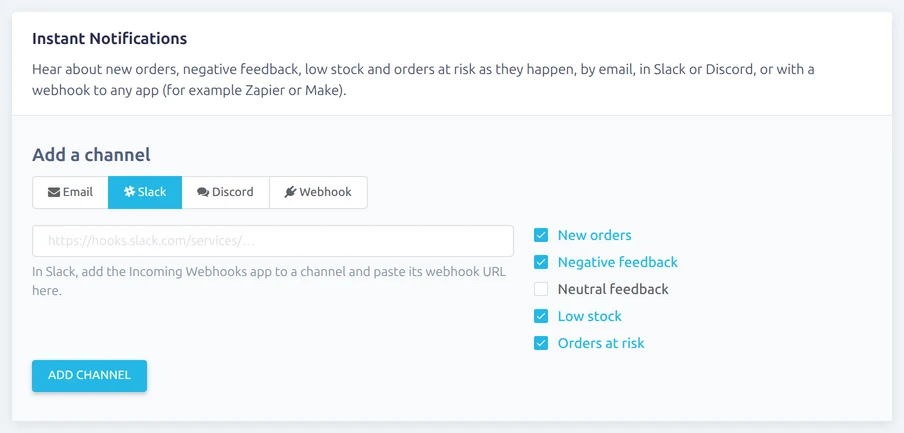
- Email: any email address, such as yours or a shared inbox.
- Slack: in Slack, add the Incoming Webhooks app to a channel and paste its webhook URL (it starts with https://hooks.slack.com/).
- Discord: in the Discord channel's settings, go to Integrations → Webhooks and copy the webhook URL.
- Webhook: any https address. Vendsta posts JSON to it, so you can connect tools such as Zapier or Make.
You can add as many channels as you like. Each one can be switched off, tested with Send test, or removed. If a notification can't be delivered, Vendsta tries again twice over the next few minutes and shows the error on the channel.

Webhooks
Each webhook gets a JSON body like this:
{
    "event": "new_order",
    "title": "New order for £24.99",
    "text": "...",
    "url": "https://app.vendsta.com/order/...",
    "account": "your eBay account",
    "data": { },
    "sent_at": "2026-10-28T12:00:00+00:00"
}
To check a webhook really came from Vendsta, use the signing secret shown on the channel. Each request has an X-Vendsta-Timestamp header and an X-Vendsta-Signature header of the form sha256=.... The signature is the HMAC-SHA256 of the timestamp, a dot, and the raw request body, using your signing secret.
The negative and neutral feedback emails from Feedback Notifications still work as before.